
The API Setup page explains how developers authenticate and test Optum Real Medical APIs before invoking any business endpoints. Optum Real uses OAuth 2.0 with bearer tokens, and setup is required for both sandbox and production environments.
Pre‑requisite: Identify Integration Workflow and System
Before starting the integration process, providers must identify where in their workflow tool (or EHR) they intend to integrate the Optum Real Medical APIs.
Identification of the integration point is required before integration can begin.
Before you start making API calls, it’s important to understand how authentication works and how each step fits together. Optum Real APIs use OAuth 2.0 for secure access, which means you’ll need valid credentials and a bearer token to interact with our gateway.
Why API Setup Matters:
- Credentials are your identity in the Optum ecosystem.
- Bearer tokens are your secure access keys for every API call.
- Sandbox testing ensures your integration works before going live.
✅Step1: Get Your Credentials: Client ID & Secret Key
- You’ll receive Client ID and secret key for two environments:
- Sandbox – for testing APIs before or after subscribing to an API.
- Production – provided after your subscription is processed.
These credentials are unique to your organization and API environment.
Details:
- Sandbox Credentials
Request a Client ID and secret key for the sandbox environment before subscribing to an API or while waiting for production credentials.
https://marketplace.optum.com/apiservices/api-sandbox-access - Production Credentials
Available via your Optum AI Marketplace account or email after subscribing to an API.
Important:
Your IT team must use these credentials to generate a bearer token for sandbox or production endpoints.
NOTE: You will have two sets of credentials:
- Sandbox — for testing APIs before or after signing a contract.
- Production — provided after contract signing or subscription processing.
Credentials are unique to your organization and API environment.
If you don’t have credentials, contact your account manager or API consultant.
✅Step2: Associate TINs for Sandbox and Production
The Optum Real TIN Association tool is available to help with keeping your associated TIN list updated. This is a self-service file upload tool that collects your TIN list and transmits it to the appropriate file location for processing. The tool consists of an upload wizard and a separate tab that displays all successfully loaded TINs so that users can have a clear understanding of status and can set appropriate expectations for API responses to transactions from specific TINs.
Details:
To get started with the TIN Association process:
Refer to Real File Manager instructions page.
✅Step3: Generate a Bearer Token
- Use your credentials obtained in Step 1 to generate a bearer token using using: Authenticationfrom the authentication endpoint.
- This token acts as a secure key for API calls and is valid for 1 hour.
- Automate token refresh for efficiency.
Details:
Bearer token lifespan The lifespan of a bearer token is one hour (3600 seconds) for both sandbox and production environments.
We recommend automating transactions using the tokens generated over the token lifespan. Obtaining tokens for each transaction is less efficient and does not improve the security criteria for any transactions.
Bearer token: Token should be generated using the API credentials Optum provides for sandbox access or production credentials received after subscribing to an API.
| Instance | URL | Notes |
|---|---|---|
| Sandbox | https://sandbox-apigw.optum.com/apip/auth/sntl/v1/token | Use ClientID and secret key provided in the request sandbox response email to generate token through this URL. |
| Production | https://apigw.optum.com/apip/auth/sntl/v1/token | Use ClientID and secret key in the account section after the API subscription status is “subscribed” to generate token through this URL. NOTE: Please use postman to generate bearer token for production. |
✅Step4: Test in Sandbox
- Start with the sandbox environment to validate your integration without financial obligations.
- Use the Try It interface or tools like Postman to make test calls.
- You can test with mock data or send live data once your API status is “subscribed.”
Details:
- Request a sandbox account (no financial obligation)- select the API under "Optum real" product category.
Includes Client ID and secret key. - Generate a bearer token using: Authentication
Or use Postman. - Test APIs using:
- “Try It” interface under each API
- Postman
(Refer to individual API Technical Reference Guide for details.) - Sandbox for Live & Mock Data Testing
- Customers must have purchased an API with status “subscribed” in the AI Marketplace account, please work with API consultant to associate provider TIN(s) before sending live data to sandbox environment.
- Customers must use their sandbox credentials to send live data to the sandbox environment for the API purchased.
At this point, responses will be based on the live data submitted to the sandbox environment as opposed to mock data preloaded to the sandbox environment. - The customer will retain the ability to query mock responses from a sandbox environment by using an optional request header called “environment”. By placing the value “sandbox" in the optional header, the request return mock responses.
NOTE: Do not submit PHI or PII data in the TRY IT page.
✅Step5: Begin Integration / Production
After successful sandbox testing and successful API subscription, switch to production credentials and endpoints.
Integration Readiness Reminder
Before starting the integration process, providers must identify where in their workflow tool (or EHR) they intend to integrate the Optum Real Medical APIs.
Identification of the integration point is required before integration can begin.
See sample request and response bearer token format for reference
Bearer token request header: **
Content-Type: application/json
Authorization: Bearer
Bearer token request and response example:
Bearer token request format
curl -X POST \

  '** (placeholder for URL)/**' \

  -H 'Content-Type: application/json' \

  -d '{

  "client_id": "<Your-ClientId>",

  "client_secret": "<Your-ClientSecret>",

  "grant_type": "client_credentials"

}'
Bearer token response example:
{

    "access_token":

    "eyJraWQiOiIxIiwidHlwIjoiSldUIiwiYWxnIjoiUlMyNTYifQ.eyJhY2Nlc3NfdG9rZW4iOiJkc1JvRTMzSFYzbnpkYjh3ak1hWWtFUmY4VVF5IiwiYXVkIjoiYXBpUGxhdGZvcm0iLCJuYmYiOjE2MTA0OTMxMTAsImFwaV9wcm9kdWN0X2xpc3QiOlsiTU5fUHJvZHVjdF9DbGFpbVN0YXR1c192MiIsIk1OX1Byb2R1Y3RfRWxpZ2liaWxpdHlfdjMiLCJNTl9Qcm9kdWN0X1Byb2Zlc3Npb25hbENsYWltc192MyIsIlRQX1Byb2R1Y3RfVHJhZGluZ1BhcnRuZXJzX3Y3IiwiTU5fUHJvZHVjdF9SZXBvcnRzX3YxIiwiTU5fUHJvZHVjdF9BdHRhY2htZW50c192MSIsIk1OX1Byb2R1Y3RfSW5zdGl0dXRpb25hbENsYWltc192MSIsIk1OX1Byb2R1Y3RfUERfQ2xhaW1zU3RhdHVzX3YxIiwiTU5fUHJvZHVjdF9QRF9DbGFpbXNfdjEiLCJNTl9Qcm9kdWN0X1BEX0VsaWdpYmlsaXR5X3YxIiwiVFBfUHJvZHVjdF9UcmFkaW5nUGFydG5lciJdLCJhcHBsaWNhdGlvbl9uYW1lIjoiSU5fQVBJUF9NTl9DSENfVGVzdEFwcCIsImRldmVsb3Blcl9lbWFpbCI6ImNkcHRlYW1AY2hhbmdlaGVhbHRoY2FyZS5jb20iLCJpc3MiOiJodHRwczovL3NhbmRib3guYXBpcy5jaGFuZ2VoZWFsdGhjYXJlLmNvbSIsImV4cCI6MTYxMDQ5NjcxMCwiaWF0IjoxNjEwNDkzMTEwLCJqdGkiOiJjNjQ4ODBjMC1hZDFhLTQ1NzEtOGJjYi02YmI2NGQ1YWRlYTgifQ.t8YPbCuyn_CNXmMIwlIL0y14j-RqO1VsHSkahtXZrf5uURZ0grU_oDepwNeRKf2Sr8norTSEsKvjPSFHaKxb_U7yQ2g9UnyH5PA1X63-Lj5v8h38BdUk19p2GQBJSzmGPEyazvYoCCxSGZ68RN9kZb_WrQWObsrMyb1JFN_zeWa2j3YGgbBglZNO_Wt1Ty6ZQrDWcxeVMlbIRMDAKYBUrmmTTsIpHrol-5YzyYgZVBpO-Hxz_otD4t-_DRx5_cxLl4tG1qi7i2Ddb65eO3XxQU-Ibzb9bAT4HXIR3Ab735cTJMBlK9jCfDc0DDCBkpGAHwJV5rj0zOEitC1xciLt3g",


    "token_type": "bearer",

    "expires_in": 3600

}
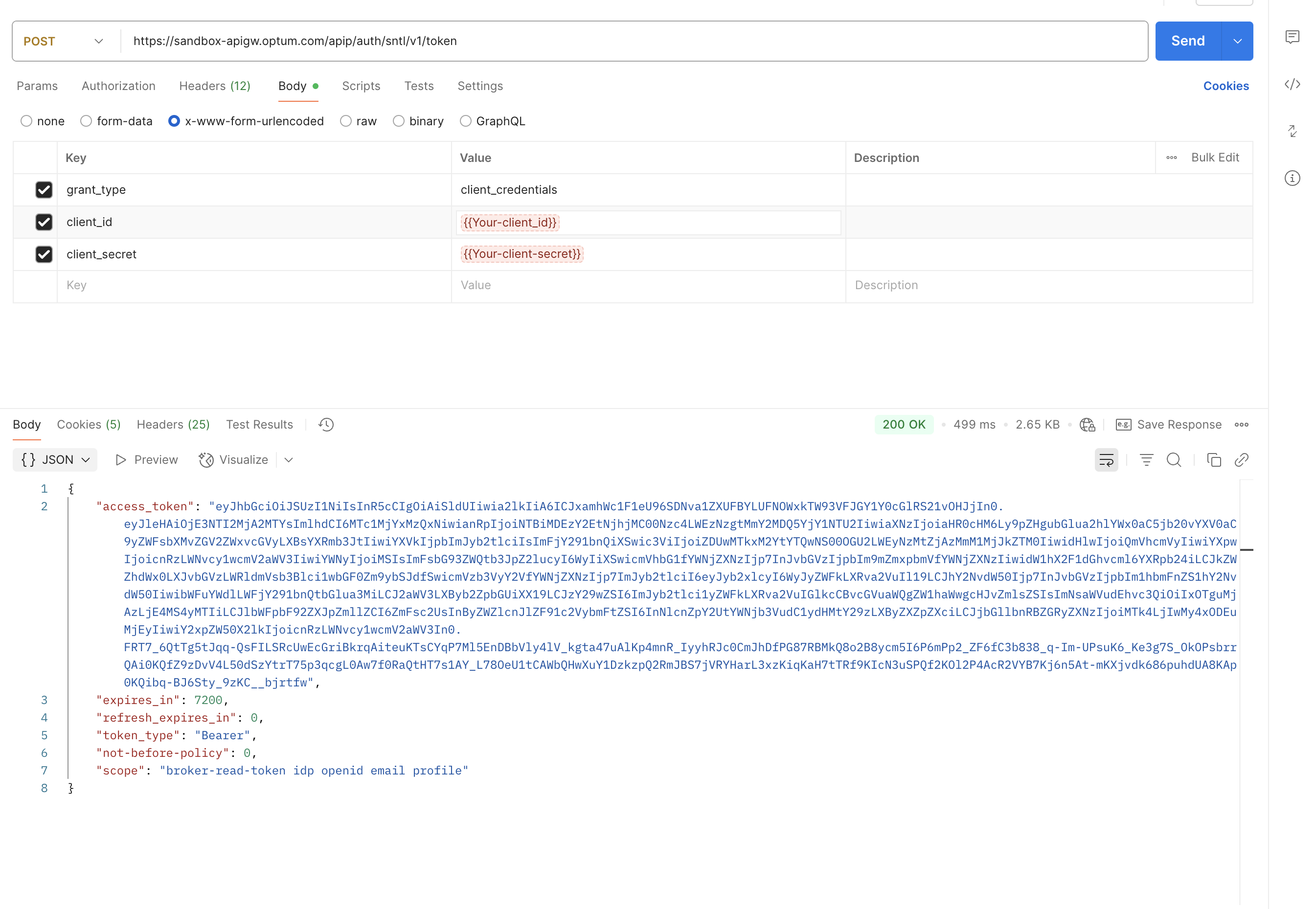
Sandbox sample screenshot