NOTE
Please use the table of contents on the right side of this page to quickly navigate to a desired section.
API Data Dictionary
The following data dictionary includes all the essential information you will need to integrate with our Claim Status API and serves as a ready reference source should you encounter a problem. It is intended to support developers, analysts and stakeholders in understanding the structure, usage, and expected values of the data exchanged through the system.
Use this data dictionary:
- As a reference when integrating with or troubleshooting the API/data interface.
- Ensure all required fields are populated when constructing requests.
- Refer to the HTTP status codes section for guidance on resolving issues.
Query examples — See the following example queries or API requests that illustrate the usage and expected formats; useful for developers and testers to understand expected formats and usage patterns.
Request body — Defines the input parameters required for API calls or data queries. Includes field names, data types, required/optional status, and descriptions.
Parameters — Provide required and optional fields for the API calls.
Response body — Lists the fields returned in the response payload. Includes field names, data types, formats, and descriptions.
NOTE
Please note that our APIs are private and secure, and require unique credentials to generate a Bearer token and gain access to. Please see (generate a Bearer token based on your API environment) to obtain access to our APIs.
URLs
| Sandbox | Production |
|---|---|
Generate Bearer token — https://sandbox-apigw.optum.com/apip/auth/sntl/v1/tokenHealth check — https://sandbox-apigw.optum.com/healthcheckClaim Status — https://sandbox-apigw.optum.com/oihub/dental/claim/inquiry/v1 | Generate Bearer token — https://apigw.optum.com/apip/auth/sntl/v1/tokenHealth check — https://apigw.optum.com/healthcheckClaim Status — https://apigw.optum.com/oihub/dental/claim/inquiry/v1 |
Generate a Bearer token
Click Generate Bearer Token for Optum Real Dental APIs, for steps, see Generate a Bearer Token.
Dental Claim Status OpenAPI Spec
To download, click Dental Claim Status OpenAPI spec.
Perform API health check
The /healthcheck endpoint verifies that the connection to the API server is established and the API is operational. Use your Bearer token to perform API health check.
API TESTING/USING
- In our developer portal TryIt! interface
- You need to reapply the Bearer token within the Bearer token expiry span by entering it in the CREDENTIALS box to test/use different APIs.
- In your development platform
- The generated Bearer token need not be reapplied or re-entered to test/use different APIs; the same Bearer token will be used across all transactions during the full token lifespan, and you can automatically refresh the token just before it expires.
In the developer portal TryIt! interface
- Paste the Bearer token (generated as mentioned in the section above) in the CREDENTIALS >> Bearer box as mentioned in the Generate a Bearer token section above.
- Click Try It! under the cURL Request box.
If the request was successful, the response shows such as, {"message": "Service is healthy"} in the RESPONSE box to indicate that the APIs are operational and are accessible. If the request failed, the reason shows in the RESPONSE box as listed in the HTTP Status Codes section at the end of this page or click the link in the TOC on the right.
Note that each API health message depends on the API being tested/used.
The Bearer token will be valid until the Bearer token expires to try the APIs.
Reference: HTTP status codes
In your development platform
- Download our OpenAPI Spec (for example, to access a product OpenAPI spec you are using/testing, go to the required API Overview section >> click Download OpenAPI Spec.) and import it into the API project in your development platform.
- Expand the API collection folder and click the
Get Tokenendpoint to generate a Bearer token. - Click the
Bodytab and enter your unique secure credentials.grant_type: client_credentialsclient_id: your client_idclient_secret: your client_secret
- Send the request to generate a Bearer token.
- Now, click the
/healthcheckendpoint and send it view if the connection to the API server was established.
If the request was successful, the response shows such as, {"message": "Service is healthy"} in the RESPONSE box to indicate that the APIs are operational and are accessible. If the request failed, the reason shows in the RESPONSE box as listed in the HTTP Status Codes section at the end of this page or click the link in the TOC on the right.
Note that each API health message depends on the API being tested/used.
Run the Dental Claim Status
/claim/inquiry/v1 (link to Dental Claim Status API) — Supports on-demand, real-time (RT) Dental Claim Status inquiries initiated by providers.
TIP
- Choose an option to test/use our APIs, that is, in our developer portal TryIt! interface (you need to copy and paste the unexpired Bearer token generated for testing the Healthcheck) and/or in your development platform.
- Repeat the steps provided in the Perform API Healthcheck >> In your developer platform or In our developer portal TryIt! interface section.
You can use the example field values provided in the Parameters table).
Parameters
| Parameter | In Developer Portal (pre-populated in Try It! interface) | In Development Platform | Description |
|---|---|---|---|
operationName | Select the value | Click the Body tab to enter (see the example below) | Name of the GraphQL operation to execute, SearchClaim |
query | Select/enter the query request body (example given below) | Click the Body tab to enter (see the following example) | GraphQL query for the SearchClaim operation (required) |
| Variables | Expand (press the + symbol) the variables >> input objects to enter | Variables for the SearchClaim GraphQL query | |
searchClaimInput | Expand (press the + symbol) the variables >> input objects to enter | Search claim status and claim details using supported member, provider, claim, and service date criteria. | |
searchClaimInput Object | Expand (press the + symbol) the variables >> input objects to enter the SearchClaim operation request data (example given below) | Click the Body tab to enter (see the following example) | Input for the SearchClaim operation. payerId, memberId, memberFirstName, memberLastName, and memberDateOfBirth (required). At least one of claimNumber or patientAccountNumber must also be provided — claimNumber for internal Optum network searches (payer-assigned ICN/DCN), patientAccountNumber for external network searches (provider-assigned account number). Both may be provided. memberId, memberFirstName, and memberLastName are required for the IMN Claim Status API V2 subscriber requirements. serviceStartDate and serviceEndDate (optional) — when provided, both must be supplied together with a maximum 90-day range. All dates must be in the MM/DD/YYYY format |
payerId | Select the pre-populated value or enter a non-PHI value | Click the Params tab to add | Your 5-digit Unique identifier of the dental insurance payer ID (Required), example, 87726 . This maps to tradingPartnerServiceId in the Claim Status API V2 |
claimNumber | Select the pre-populated value or enter a non-PHI value | Click the Params tab to add | (one-with the patientAccountNumber). Payer-assigned claim number (ICN/DCN) used for internal Optum network searches. At least one of claimNumber or patientAccountNumber, for example, 1234567890 must be provided. This maps to encounter.tradingPartnerClaimNumber (REF\*1K) in Claim Status API V2 |
patientAccountNumber | Select the pre-populated value or enter a non-PHI value | Click the Params tab to add | One with claimNumber (Required). Provider-assigned patient account number used for external network searches. At least one of the values, claimNumber or patientAccountNumber, for example, 1234567890 must be provided. This maps to encounter.patientAccountNumber (REF\*EJ) in Claim Status API V2 |
memberId | Select the pre-populated value or enter a non-PHI value | Click the Params tab to add | Member insurance ID (Required), for example, 1234567890. This maps to subscriber.memberId in Claim Status API V2 |
memberFirstName | Select the pre-populated value or enter a non-PHI value | Click the Params tab to add | Member's first name (Required), for example, John. This maps to subscriber.firstName in Claim Status API V2 |
memberLastName | Select the pre-populated value or enter a non-PHI value | Click the Params tab to add | Member's last name (Required), Cena. This maps to subscriber.lastName in Claim Status API V2 |
memberDateOfBirth | Select the pre-populated value or enter a non-PHI value | Click the Params tab to add | Member date of birth (Required), for example 10/01/1975 (in MM/DD/YYYY format). This maps to subscriber.dateOfBirth (DMG02, format YYYYMMDD) in Claim Status API V2 |
memberPolicy | Select the pre-populated value or enter a non-PHI value | Click the Params tab to add | Member's dental policy/group number, for example 002781 (Optional) |
serviceStartDate | Select the pre-populated value or enter a non-PHI value | Click the Params tab to add | Date of service start (Optional), for example 01/01/2025 (in MM/DD/YYYY format). When provided, must be used together with serviceEndDate. Maximum 90-day range. This maps to encounter.beginningDateOfService (DTP\*472, format YYYYMMDD) in Claim Status API V2 |
serviceEndDate | Select the pre-populated value or enter a non-PHI value | Click the Params tab to add | Date of service end (Optional), for example 01/05/2025 (in MM/DD/YYYY format). When provided, must be used together with serviceStartDate. Maximum 90-day range. Maps to encounter.endDateOfService (DTP\*472, format YYYYMMDD) in Claim Status API V2 |
billingNpi | Select the pre-populated value or enter a non-PHI value | Click the Params tab to add | 10-digit National Provider Identifier (NPI) (Optional) of the billing dental provider. If not provided, NPI is omitted from the IMN request. This maps to providers\[].npi (NM108=XX, NM109) in Claim Status API V2 |
billingTin | Select the pre-populated value or enter a non-PHI value | Click the Params tab to add | Tax Identification Number (Optional), for example 123456789 of the billing dental provider. If not provided, falls back to the providerTaxId header value. This maps to providers\[].tin (NM108=FI) in Claim Status API V2. If this value is not provided, falls back to the providerTaxId header value |
submitterId | Select the pre-populated value or enter a non-PHI value | Click the Params tab to add | ISA06 submitter identifier (Optional), for example, SUBMITTER001, passed in the request body. Alphanumeric, max 50 characters. Used for logging and enrollment status verification |
search277CAInput Object | |||
transactionId | Select the pre-populated value or enter a non-PHI value | Click the Params tab to add | Your transactionId generated when running the claim submission action API, for example, 5ZHN1777891946530211 (see the response example in the Dental Claim Actions API (required) to retrieve 277 claim acknowledgement by transactionId (returned from claim submission API) |
payerId | Select the pre-populated value or enter a non-PHI value | Click the Params tab to add | Unique identifier assigned to a health insurance payer, your 5-digit payer ID (Required), for example, 88848 |
| Headers | |||
providerTaxId | Enter the provider's tax ID | Click the Params tab to add | Provider Tax Identification Number (TIN) (Required) (example, 999999). Used as fallback billing TIN when billingTin is not provided in the request body. This maps to providers\[].tin in Claim Status API V2 |
x-optum-consumer-correlation-id | Enter the x-optum-consumer-correlation-id (your gateway identifier) | Click the Params tab to add | Unique UUID (Required) used to track the transaction end-to-end (for example: 4d4a8964-e5fa-42dc-a37d-12345789). Serves as the tracking/control number for the claim identification process. This maps to encounter.trackingNumber in Claim Status API V2 |
environment | Enter the x-optum-consumer-correlation-id (your gateway identifier) | Click the Params tab to add | Target environment (e.g., sandbox, production) (Required) |
nextPageToken | Enter the x-optum-consumer-correlation-id (your gateway identifier) | Click the Params tab to add | Pagination identifier, for example trwmem123451416167 (Required) to retrieve the next set of claim records |
IMPORTANT
Please do not submit PHI or PII data on the developer portal's Try It! interface.
query SearchClaim($searchClaimInput: SearchClaimInput!) { searchClaim(searchClaimInput: $searchClaimInput) { claims { claimNumber claimReceiptLocatorNumber claimStatus hasClaimDetails member { subscriberId policyNumber firstName lastName middleInitial dateOfBirth relationshipCode dependentSequenceNumber memberId } provider { submitted { billingTin billingProviderName billingNpi renderingProviderName } adjudicated { billingTinPrefix billingTin billingTinSuffix billingProviderName billingNpi billingProviderMpin renderingProviderName renderingProviderMpin } } claimEvents { receivedDate processedDate processedTime serviceStartDate serviceEndDate statusEffectiveDate } claimLevelInfo { patientAccountNumber claimType providerNetworkStatus claimFlagTag surpriseMedicalBillingIndicator surpriseMedicalBillingState } claimLevelTotalAmount { totalBilledChargeAmount totalProviderWriteOffAmount totalPatientNotCoveredAmount totalProviderNotCoveredAmount totalAllowedAmount totaldeductibleAmount totalCopayAmount totalCoinsAmount totalPaidAmount totalPatientResponsibilityAmount } payments { paymentNumber adjudicatedClaimPaymentNumber adjudicatedClaimPaymentAmount checkSeriesDesignator paymentModeCode paymentAmount paymentIssueDate claimPayeeAssignmentCode payeeName payeeAddress { addressLine cityName state zip } } claimStatusCrosswalkData { claim507Code claim507CodeDesc claim508Code claim508CodeDesc adjudicatedClaimSuffixCode adjudicatedClaimPaymentNumber } claimAdjudicationCodes { claimCodeType code description } documents { documentType documentCreatedDate documentReceivedDate documentName documentId } claimDetailedInformation { claimNumber adjudicatedClaimSummaryStatus claimActionIdentifier allowedActions payerId coordinationOfBenefits { cobPayerId claimOIPaidAmount otherInsuredName submittedCobIndicator cobPayerType cobDesc cobPolicyDesc cobPaymentType adjudicatedCobIndicator cobMedicalCalcType cobCommercialCalcType } diagnosisCodes { diagnosisSequenceNumber diagnosisCode diagnosisCodeType } claimDetailEvents { receivedDate initialDecisionDate lastDenialDate } claimLevelIndicators { claimReprocessedIndicator paymentToEnrolleeCode isCapitationIndicator electronicPayerID placeOfService payerType } patientInfo { patientName patientGroupNumber patientSubscriberNumber patientRelationship } { lineKey lineNumber unitCount serviceCode revenueCode linePaymentServiceCode procedureCode procedureTypeCode modifiers diagnosisPointers lineEvents { processedDate processedTime serviceStartDate serviceEndDate } lineLevelTotalAmounts { billedChargeAmount notCoveredAmount providerNotCoveredAmount patientNotCoveredAmount providerWriteOffAmount allowedAmount deductibleAmount copayAmount coinsuranceAmount paidAmount memberResponsiblityAmount medicarePaidAmount reserveAmount qualifiedPaymentAmount } lineAdjudicationCodes { type code description } lineIndicators { inventoryControlNumberSuffix inventoryControlNumberSuffixVersion providerNetworkStatus transactionCode causeCode overrideCode planCoveragePercent capitationIndicator capFundType lineLevelPlaceOfService surpriseMedicalBillingIndicator surpriseMedicalBillingState providerGroupOfferPercentage } } } } pagination { hasMoreRecords nextPageToken } } }
IMPORTANT
Please note that the request requires you to provide all the required field values. Please note that these required values are GREYED out, which are pre-populated example values and can be selected to view the canned response. To view the required fields, expand the + symbol (indicated by the
variablesfield below.
{
  "data": {
    "searchClaim": {
      "claims": [
        {
          "claimNumber": "AB123456789",
          "claimReceiptLocatorNumber": "9322320112345",
          "claimStatus": "Finalized",
          "hasClaimDetails": true,
          "member": {
            "subscriberId": "0536219151",
            "policyNumber": "911302",
            "firstName": "John",
            "lastName": "Cena",
            "middleInitial": "D",
            "dateOfBirth": "09/16/1965",
            "relationshipCode": "EE",
            "dependentSequenceNumber": "01",
            "memberId": "483865773"
          },
          "provider": {
            "submitted": {
              "billingTin": "12345678",
              "billingProviderName": "Test Dental Group",
              "billingNpi": "1043382302",
              "renderingProviderName": "Jane Doe DDS"
            },
            "adjudicated": {
              "billingTinPrefix": "2",
              "billingTin": "12345678",
              "billingTinSuffix": "00003",
              "billingProviderName": "Test Dental Group",
              "billingNpi": "1043382302",
              "billingProviderMpin": "73123456",
              "renderingProviderName": "Jane Doe DDS",
              "renderingProviderMpin": "12345678"
            }
          },
          "claimEvents": {
            "receivedDate": "06/10/2025",
            "processedDate": "06/25/2025",
            "processedTime": "07.42.49",
            "serviceStartDate": "06/01/2025",
            "serviceEndDate": "06/01/2025",
            "statusEffectiveDate": "06/27/2025"
          },
          "claimLevelInfo": {
            "patientAccountNumber": "I-57258454",
            "claimType": "D",
            "providerNetworkStatus": "I",
            "claimFlagTag": "Y",
            "surpriseMedicalBillingIndicator": "S",
            "surpriseMedicalBillingState": "CA"
          },
          "claimLevelTotalAmount": {
            "totalBilledChargeAmount": "1144.21",
            "totalProviderWriteOffAmount": "137.31",
            "totalPatientNotCoveredAmount": "0.00",
            "totalProviderNotCoveredAmount": "0.00",
            "totalAllowedAmount": "1006.90",
            "totaldeductibleAmount": "0.00",
            "totalCopayAmount": "0.00",
            "totalCoinsAmount": "0.00",
            "totalPaidAmount": "1006.90",
            "totalPatientResponsibilityAmount": "0.00"
          },
          "payments": [
            {
              "paymentNumber": "TZ12341212",
              "adjudicatedClaimPaymentNumber": "32112121221",
              "adjudicatedClaimPaymentAmount": "671.13",
              "checkSeriesDesignator": "806",
              "paymentModeCode": "E",
              "paymentAmount": "1006.90",
              "paymentIssueDate": "02/18/2025",
              "claimPayeeAssignmentCode": "P",
              "payeeName": "Test Dental Group",
              "payeeAddress": {
                "addressLine": "PO BOX 406152",
                "cityName": "ATLANTA",
                "state": "GA",
                "zip": "303846152"
              }
            }
          ],
          "claimStatusCrosswalkData": [
            {
              "claim507Code": "F1",
              "claim507CodeDesc": "Finalized/Payment-The claim/line has been paid.",
              "claim508Code": "65",
              "claim508CodeDesc": "Claim/line has been paid.",
              "adjudicatedClaimSuffixCode": "01",
              "adjudicatedClaimPaymentNumber": "0087637641"
            }
          ],
          "claimAdjudicationCodes": [
            {
              "claimCodeType": "REMARK",
              "code": "YL",
              "description": "Benefits for this claim are based on the provider's contracted rate."
            }
          ],
          "documents": [
            {
              "documentType": "Dental/Detailed PRAs",
              "documentCreatedDate": "06/18/2025",
              "documentReceivedDate": "06/18/2025",
              "documentName": "ABCD",
              "documentId": "abcdef-aaaa-aaaa-aa-aaaa%ee-08_v4~repoid~fdsid~cloudspaceid"
            }
          ],
          "claimDetailedInformation": {
            "claimNumber": "AB123456789",
            "adjudicatedClaimSummaryStatus": "Finalized/Payment - The claim/line has been paid.",
            "claimActionIdentifier": "12345-123391-129910-1192010",
            "allowedActions": "true",
            "payerId": "87726",
            "coordinationOfBenefits": {
              "cobPayerId": "LIFE1",
              "claimOIPaidAmount": "25.00",
              "otherInsuredName": "XYZ Health Insurance",
              "submittedCobIndicator": "P",
              "cobPayerType": "COM",
              "cobDesc": "",
              "cobPolicyDesc": "",
              "cobPaymentType": "",
              "adjudicatedCobIndicator": "S",
              "cobMedicalCalcType": "612",
              "cobCommercialCalcType": "612"
            },
            "diagnosisCodes": [
              {
                "diagnosisSequenceNumber": "1",
                "diagnosisCode": "K02.9",
                "diagnosisCodeType": "0"
              }
            ],
            "claimDetailEvents": {
              "receivedDate": "06/04/2025",
              "initialDecisionDate": "06/06/2025",
              "lastDenialDate": "06/06/2025"
            },
            "claimLevelIndicators": {
              "claimReprocessedIndicator": "N",
              "paymentToEnrolleeCode": "N",
              "isCapitationIndicator": false,
              "electronicPayerID": "87726",
              "placeOfService": "11",
              "payerType": "COM"
            },
            "patientInfo": {
              "patientName": "John Cena",
              "patientGroupNumber": "TNEONX",
              "patientSubscriberNumber": "992111233",
              "patientRelationship": "EE"
            },
            "lines": [
              {
                "lineKey": "lrizy7ahqahdbt1752584225159",
                "lineNumber": "1",
                "unitCount": "1",
                "serviceCode": "D2750",
                "revenueCode": "0121",
                "linePaymentServiceCode": "D2750",
                "procedureCode": "D2750",
                "procedureTypeCode": "AD",
                "modifiers": [],
                "diagnosisPointers": [
                  "1",
                  "0",
                  "0",
                  "0"
                ],
                "lineEvents": {
                  "processedDate": "06/06/2025",
                  "processedTime": "04.40.07",
                  "serviceStartDate": "06/01/2025",
                  "serviceEndDate": "06/01/2025"
                },
                "lineLevelTotalAmounts": {
                  "billedChargeAmount": "1144.21",
                  "notCoveredAmount": "0.00",
                  "providerNotCoveredAmount": "0.00",
                  "patientNotCoveredAmount": "0.00",
                  "providerWriteOffAmount": "137.31",
                  "allowedAmount": "1006.90",
                  "deductibleAmount": "0.00",
                  "copayAmount": "0.00",
                  "coinsuranceAmount": "0.00",
                  "paidAmount": "1006.90",
                  "memberResponsiblityAmount": "0.00",
                  "medicarePaidAmount": "0.00",
                  "reserveAmount": "0.00",
                  "qualifiedPaymentAmount": "0.00"
                },
                "lineAdjudicationCodes": [
                  {
                    "type": "REMARK",
                    "code": "YL",
                    "description": "Benefits for this claim are based on the provider's contracted rate."
                  }
                ],
                "lineIndicators": {
                  "inventoryControlNumberSuffix": "01",
                  "inventoryControlNumberSuffixVersion": "1",
                  "providerNetworkStatus": "I",
                  "transactionCode": "00",
                  "causeCode": "0",
                  "overrideCode": "23",
                  "planCoveragePercent": "1.00",
                  "capitationIndicator": "N",
                  "capFundType": "B",
                  "lineLevelPlaceOfService": "11",
                  "surpriseMedicalBillingIndicator": "S",
                  "surpriseMedicalBillingState": "CA",
                  "providerGroupOfferPercentage": "1.00"
                }
              }
            ]
          }
        }
      ],
      "pagination": {
        "hasMoreRecords": false,
        "nextPageToken": "trwmem123451416167"
      }
    }
  }
}
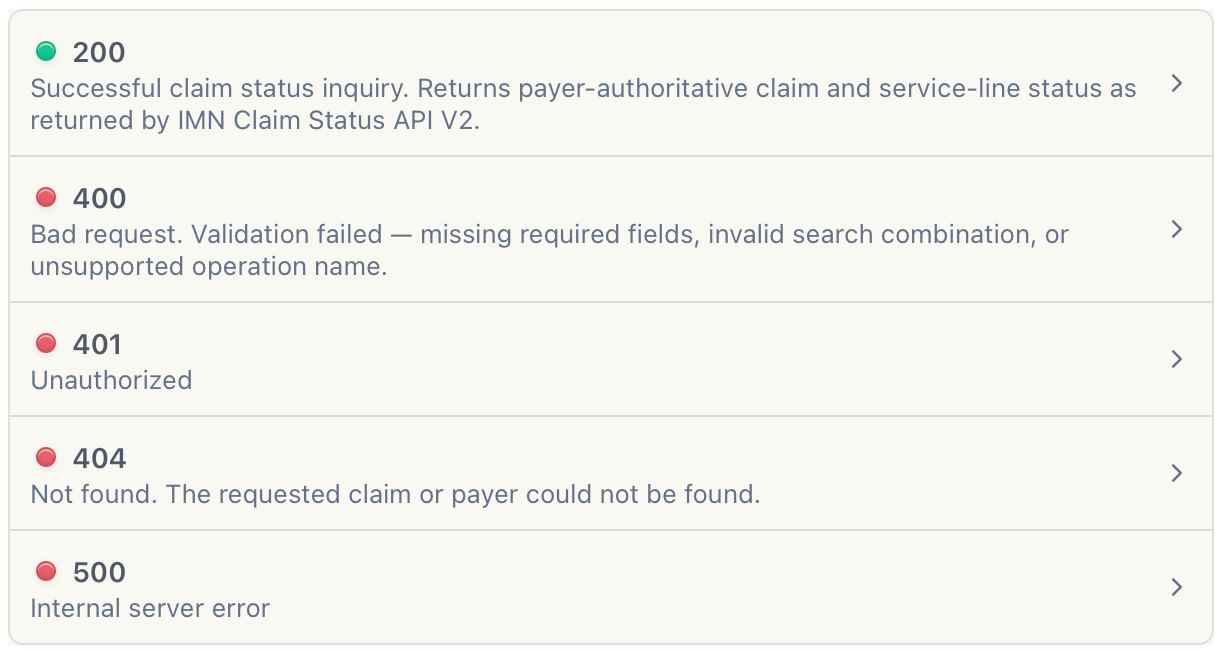
If the request was successful, the response shows "200 Successful response" and the information (see the following example) shows in the RESPONSE box. If the request failed, the reason shows in the RESPONSE box as listed in the HTTP Status Codes section at the end of this page or click the HTTPS Status Codes hyperlink in the TOC on the right.
{
  "data": {
    "search277CA": {
      "responseType": "ACK",
      "x12ResponseData": "ISA*00*          *00*          *ZZ*ABCDEFGHIJKLMNO*12*123456789012345*210101*1253*^*00501*000000905*0*T*:~GS*HN*123456789*987654321*20210101*1253*1*X*005010X279A1~ST*277*0001~BHT*0019*00*0123*20210101*1253*RP~HL*1**20*1~NM1*PR*2*PAYER NAME*****PI*12345~HL*2*1*21*1~NM1*41*2*SENDER NAME*****46*54321~HL*3*2*22*0~TRN*1*1234567890~STC*A1:19:PR~SE*10*0001~GE*1*1~IEA*1*000000905~",
      "statuscode": "200",
      "message": "Transaction processed successfully"
    }
  }
}
API Setup
For information about, setting your API test environment, please see API Setup.
Subscribe to live and mock data testing in sandbox
Please see Subscribe to live and mock data testing in sandbox.
Integrate our APIs in your production environment
Please see Integrate our APIs in production environment.
HTTP Status Codes
The following are the status codes and messages.