NOTE
Please use the table of contents on the right side of this page to quickly navigate to a desired section.
API Data dictionary
The following data dictionary includes all the essential information you will need to integrate with our Pre-Care Estimate API and serves as a ready reference source should you encounter a problem. It is intended to support developers, analysts and stakeholders in understanding the structure, usage, and expected values of the data exchanged through the system.
Use this data dictionary:
- As a reference when integrating with or troubleshooting the API/data interface.
- Ensure all required fields are populated when constructing requests.
- Refer to the HTTP status codes section for guidance on resolving issues.
Query examples — See the following example queries or API requests that illustrate the usage and expected formats; useful for developers and testers to understand expected formats and usage patterns.
Request body — Defines the input parameters required for API calls or data queries. Includes field names, data types, required/optional status, and descriptions.
Parameters — Provide required and optional fields for the API calls.
Response body — Lists the fields returned in the response payload. Includes field names, data types, formats, and descriptions.
NOTE
Please note that our APIs are private and secure, and require unique credentials to generate a Bearer token and gain access to. Please see (generate a Bearer token based on your API environment) to obtain access to our APIs.
URLs
| Sandbox | Production |
|---|---|
Generate Bearer token — https://sandbox-apigw.optum.com/apip/auth/sntl/v1/tokenHealth check — https://sandbox-apigw.optum.com/oihub/dental/claim/precare/v1/healthcheckPre-Care Estimate — https://sandbox-apigw.optum.com/oihub/dental/claim/precare/v1 | Generate Bearer token — https://apigw.optum.com/apip/auth/sntl/v1/tokenHealth check — https://apigw.optum.com/oihub/dental/claim/precare/v1/healthcheckPre-Care Estimate — https://apigw.optum.com/oihub/dental/claim/precare/v1 |
Generate a Bearer token
Click Generate Bearer Token for Optum Real Dental APIs, for steps, see Generate a Bearer Token.
Pre-Care Estimate OpenAPI Spec
To download, click Pre-Care Estimate OpenAPI Spec.
Perform API health check
The /healthcheck endpoint verifies that the connection to the API server is established and the API is operational. Use your Bearer token to perform API health check.
API TESTING/USING
- In our developer portal TryIt! interface
- You need to reapply the Bearer token within the Bearer token expiry span by entering it in the CREDENTIALS box to test/use different APIs.
- In your development platform
- The generated Bearer token need not be reapplied or re-entered to test/use different APIs; the same Bearer token will be used across all transactions during the full token lifespan, and you can automatically refresh the token just before it expires.
In the developer portal Try It! interface
- Paste the Bearer token (generated as mentioned above), in the CREDENTIALS >> Bearer box as mentioned in the Generate a Bearer token section above.
- Click Try It! under the cURL Request box.
If the request was successful, the response shows such as, {"message": "Service is healthy"} in the RESPONSE box to indicate that the APIs are operational and are accessible. If the request failed, the reason shows in the RESPONSE box as listed in the HTTP Status Codes section at the end of this page or click the link in the TOC on the right.
Note that each API health message depends on the API being tested/used.
In your development platform
- Download our OpenAPI Spec (for example, to access a product OpenAPI spec you are using/testing, go to the required API Overview section >> click Download OpenAPI Spec.) and import it into the API project in your development platform.
- Expand the API collection folder and click the
Get Tokenendpoint to generate a Bearer token. - Click the
Bodytab and enter your unique secure credentials.grant_type: client_credentialsclient_id: your client_idclient_secret: your client_secret
- Send the request to generate a Bearer token.
- Now, click the
/healthcheckendpoint and send it view if the connection to the API server was established.
The Bearer token will be valid until the Bearer token expires to try the APIs.
If the request was successful, the response shows such as, {"message": "Service is healthy"} in the RESPONSE box to indicate that the APIs are operational and are accessible. If the request failed, the reason shows in the RESPONSE box as listed in the HTTP Status Codes section at the end of this page or click the link in the TOC on the right.
Note that each API health message depends on the API being tested/used.
Run the Pre-Care Estimate
/precare/v1 (link to Pre-Care Estimate API) — Providers can perform real-time cost estimates from dental payers prior to treatment.
TIP
- Choose an option to test/use our APIs, that is, in our developer portal TryIt! interface (you need to copy and paste the unexpired Bearer token generated for testing the Healthcheck) and/or in your development platform.
- Repeat the steps provided in the Perform API Healthcheck >> In your developer platform or In our developer portal TryIt! interface section.
You can use the example field values provided in the Parameters table).
Parameters
| Parameter | In Developer Portal | In Development Platform | Description |
|---|---|---|---|
query | Enter or select (example given below) | Click the Body tab to enter (see the following example) | GraphQL query for the Pre-Care Estimate operation (pre-populated in Try It! interface) (required) |
payerId | Enter or select | Click the Params tab to add | Your 5-digit payer ID (pre-populated in Try It! interface), example, 88848 (required) |
x12RequestData | Enter or select (example given below) | Click the Body tab to enter (see the following example) | Contains 837X12 request data for Institutional/Professional claims. MUST pass member ID, First Name, Last Name, DOB, and TIN. (pre-populated in Try It! interface) (Required) |
providerTaxId | Enter or select | Click the Params tab to add | 9-digit provider tax ID (required use, 999999999) |
apim-gateway-client-id | Enter or select | Click the Params tab to add | Your gateway identifier, ex: bc32ffeb-8606-6f23-9f26-ee76438bed9f (Required) |
NOTE
Check the Headers and Body parameters to make sure that the values comply with the parameters provided in the Parameters table.
IMPORTANT
Please do not submit PHI or PII data on the developer portal's Try It! interface.
query getClaimPrecheck($input: ClaimInput!) { claimPreCheck(input: $input) { transactionId x12ResponseData responseType x12Response277CA x12Response835 message statusCode } }
Enter the information as mentioned in the preceding table and click TryIt! in the developer portal or click Send in your development platform.
IMPORTANT
Please note that the request requires you to provide all the required field values. Please note that these required values are GREYED out, which are pre-populated example values and can be selected to view the canned response. To view the required fields, expand the + symbol (indicated by the
variablesfield below.
ISA*00* *00* *ZZ*OptumTest *ZZ*UNITED HEALTHCA*260102*1655*^*00501*008165534*0*P*:~GS*HC*OptumTest*UNITED HEALTHCARE / UNIMERICA DENTAL*20260102*1655*1*X*005010X224A2~ST*837*000000001*005010X224A2~BHT*0019*00*99f401307edd-1767891334150*20260108*165534*CH~NM1*41*1*OptumTest*CHRISTINE*J***46*43e55056-95fb-48b8-a36c-e83eee46f12e~NM1*40*2*UNITED HEALTHCARE / UNIMERICA DENTAL*****PI*52133~HL*1**20*1~NM1*85*2*KIM, CHRISTINE J.*****XX*1932256344~N3*111 World Way~N4*Tustin*CA*92780~REF*EI*411854946~PER*IC*KIM, CHRISTINE J.*TE*6260000000~NM1*85*2*KIM, CHRISTINE J.*****XX*1932256344~N3*111 World Way~N4*Tustin*CA*92780~HL*2*1*22*1~SBR*P*19*275282~NM1*IL*1*MUHAMMAD*ATA****MI*042137147~DMG*D8*19740907~NM1*PR*2*UNITED HEALTHCARE / UNIMERICA DENTAL*****PI*52133~N3*PO Box 30567~N4*SaltLakeCity*UT*84130~HL*3*2*23*0~PAT*19~NM1*QC*1*ATA*MUHAMMAD****II*5718~N3*1002 WHITEHOLLOW AVE~N4*North Las Vegas*NV*89031~DMG*D8*19740907~CLM*5718*122.0***11:B:I*Y*A**N**********PB~HI*ABK:D0150A~NM1*82*1*KIM*CHRISTINE J.****NPI*1932256344~PRV*PE*PXC*1223P0221X~REF*G2*000013441315~NM1*77*2*OptumTest*CHRISTINE****NPI*1932256344~N3*1950 E CHAPMAN AVE STE 1~N4*Fullerton*CA*92831~LX*1~SV3*AD:D0150*122.0*11***1*ADULT COMPREHENSIVE ORAL EVALUATION-NEW PATIENT****1~TOO*JP*01*N~DTP*472*D8*20260108~SE*39*000000001~GE*1*1~IEA*1*008165534~
If the request was successful, the response shows "200 Successful response" and the information (see the following example) shows in the RESPONSE box. If the request failed, the reason shows in the RESPONSE box as listed in the HTTP Status Codes section at the end of this page or click the HTTPS Status Codes hyperlink in the TOC on the right.
"data": {
    "claimPreCheck": {
      "transactionId": "string",
      "x12ResponseData": "string(837 for success/ 837999 for failure)",
      "x12Response277CA": "string(277D for pre-check failed)",
      "x12Response835": "string(835D for success)",
      "responseType": "837999| 277 | 835 ",
      "message": "string",
      "statusCode": "string"
    }
  }
}
{
  "data": {
    "claimPreCheck": {
      "transactionId": "7c778a1f-fc66-3bb5-9d6c-5d74faa4307f",
      "x12ResponseData": "ISA*00*          *00*          *ZZ*OptumTest      *ZZ*UNITED HEALTHCA*260102*1655*^*00501*008165534*0*P*:~GS*HC*OptumTest*UNITED HEALTHCARE / UNIMERICA DENTAL*20260102*1655*1*X*005010X224A2~ST*837*000000001*005010X224A2~BHT*0019*00*99f401307edd-1767891334150*20260108*165534*CH~NM1*41*1*OptumTest*CHRISTINE*J***46*43e55056-95fb-48b8-a36c-e83eee46f12e~NM1*40*2*UNITED HEALTHCARE / UNIMERICA DENTAL*****PI*52133~HL*1**20*1~NM1*85*2*KIM, CHRISTINE J.*****XX*1932256344~N3*111 World Way~N4*Tustin*CA*92780~REF*EI*411854946~PER*IC*KIM, CHRISTINE J.*TE*6260000000~NM1*85*2*KIM, CHRISTINE J.*****XX*1932256344~N3*111 World Way~N4*Tustin*CA*92780~HL*2*1*22*1~SBR*P*19*275282~NM1*IL*1*MUHAMMAD*ATA****MI*042137147~DMG*D8*19740907~NM1*PR*2*UNITED HEALTHCARE / UNIMERICA DENTAL*****PI*52133~N3*PO Box 30567~N4*SaltLakeCity*UT*84130~HL*3*2*23*0~PAT*19~NM1*QC*1*ATA*MUHAMMAD****II*5718~N3*1002 WHITEHOLLOW AVE~N4*North Las Vegas*NV*89031~DMG*D8*19740907~CLM*5718*122.0***11:B:I*Y*A**N**********PB~HI*ABK:D0150A~NM1*82*1*KIM*CHRISTINE J.****NPI*1932256344~PRV*PE*PXC*1223P0221X~REF*G2*000013441315~NM1*77*2*OptumTest*CHRISTINE****NPI*1932256344~N3*1950 E CHAPMAN AVE STE 1~N4*Fullerton*CA*92831~LX*1~SV3*AD:D0150*122.0*11***1*ADULT COMPREHENSIVE ORAL EVALUATION-NEW PATIENT****1~TOO*JP*01*N~DTP*472*D8*20260108~SE*39*000000001~GE*1*1~IEA*1*008165534~",
      "responseType": "835",
      "x12Response277CA": null,
      "x12Response835": "ISA*00*          *00*          *ZZ*UNITED HEALTHCA*ZZ*OptumTest      *260317*2047*^*00501*008165534*1*T*:~GS*HP*UNITED HEALTHCARE / UNIMERICA DENTAL*OptumTest*20260317*2047*1*X*005010X221A1~ST*835*000000001~BPR*I*0.0*C*ACH*CTX***********20251203~TRN*1*RTA260769cfd8dc9f4*1*$DEFWEB1~DTM*405*20251203~N1*PR*UNITED HEALTHCARE / UNIMERICA DENTAL*PI*52133~N3*PO Box 30567~N4*SaltLakeCity*UT*84130~REF*2U*52133~N1*PE*KIM, CHRISTINE J.*XX*1932256344~N3*111 World Way~N4*Tustin*CA*92780~REF*EI*411854946~LX*1~CLP*260077003500*01*122.0*0.0*0.0**D**I~CAS*CO*PSC*122.0~NM1*QC*1*ATA*MUHAMMAD****II*5718~DTM*232*19740907~SVC*AD:D0150*122.0**11*1~DTM*472*20260108~CAS*CO*PSC*122.0~SE*21*000000001~GE*1*1~IEA*1*008165534~",
      "message": "Exactly one member found. Eligibility checked.",
      "statusCode": "200"
    }
  }
}
TIP
- Choose an option to test/use our APIs, that is, in our developer portal TryIt! interface (you need to copy and paste the unexpired Bearer token generated for testing the Healthcheck) and/or in your development platform.
- Repeat the steps provided in the Perform API Healthcheck >> In your developer platform or In our developer portal TryIt! interface section.
You can use the example field values provided in the Parameters table).
API Setup
For information about, setting your API test environment, please see API Setup.
Subscribe to live and mock data testing in sandbox
Please see Subscribe to live and mock data testing in sandbox.
Integrate our APIs in your production environment
Please see Integrate our APIs in production environment.
HTTP status codes
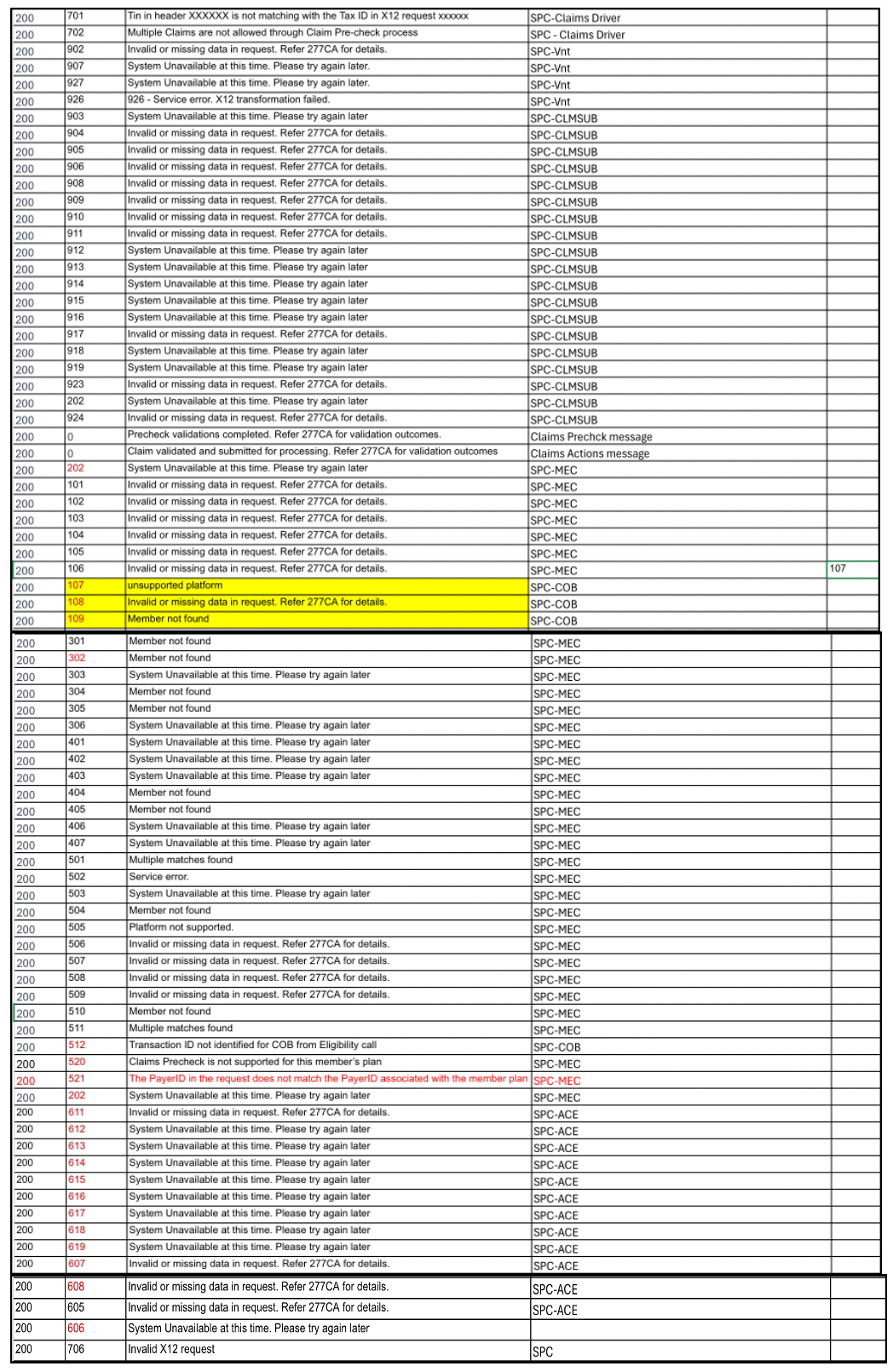
The following table provides error codes, including code values, messages, and troubleshooting guidance.
| Status Code | Error Description | Message Example | Notes |
|---|---|---|---|
| 401 | When token is blank in authorization | { "message": "access_token is missing" } | |
| 401 | When token is expired in authorization | { "message": "jwt signature verification failed: Verification failed" } | |
| 401 | When token is invalid in authorization | { "message": "invalid jwt: invalid header: " } | |
| 500 | Internal server error - Problem occurred on the server | { "errors": [ { "code": "INTERNAL_SERVER_ERROR", "description": "An unexpected error occurred while processing the request", } ] } | |
| 400 | "Cannot query field \"fieldname\" on type \"Query\" | { "errors": [ { "code": "GRAPHQL_VALIDATION_FAILED", "description": "Cannot query field \"fieldname\" on type \"Query\"., } ] } | |
| 400 | "Syntax Error: Unexpected \"}\"." | { "errors": [ { "code": "GRAPHQL_PARSE_FAILED", "description": "Schema Validation Failure", } ] } | |
| 200 | Error | { "errors": [ { "code": "BAD_USER_INPUT", "description": "Variable \"$input\" of required type \"Claimprechecknput!\" was not provided." } ] } | When request variable input fields are incorrect |
| 200 | Error | { "errors": [ { "code": "MISSING_REQUIRED_FIELD", "description": "Missing mandatory field: providerTaxId" } ], "data": { "claimsprecheck": null } } |
|
| 200 | Error | { "errors": [ { "code": "Unauthorized - Authentication failed", "description": "error : error_description" ] }, "data": { "claimsprecheck": null } } | When sub module authentication failure occurs ex: description: "invalid_client: Invalid client authentication" ex:description: "invalid_token:The access token is invalid or has expired" |