
Security and Authentication
To use Submitter API, you need the proper credentials and to submit an Authentication message to receive an access token before submitting the Pharmacy Claims message
Obtain Credentials
During the Implementation process, Optum provides you with your unique client ID, client secret, and Submitter ID. If applicable, you will also receive a Host Submitter ID. You must protect this credential information like any other secure credentials and use them to access Submitter API.
| Parameter | Description |
|---|---|
| client_id | Unique Azure client_id value Optum gives you |
| client_secret | Unique value Optum gives you that acts as a password linked to your client_id |
| submitterID | Header and unique value Optum provides that identifies and allows access to Submitter API |
| hostSubmitterID | Header and unique value Optum provides that identifies and allows access to Submitter API, if applicable |
You need the client ID and client secret to access the Optum Insight (OI) API Gateway.
Authentication Try-It in API Tools
This topic summarizes the Authentication process to gain access to the OI API Gateway, which is the first step to access any Optum API. Successful authentication To review additional documentation and the Try-It feature, see Authentication v3 Try-It in the API Tools section of the Developer Portal.
You need the Submitter ID (and the host Submitter ID, if applicable) for the Pharmacy Claims message.
Authentication Token URLs
- CERT -
https://sandbox-apigw.optum.com/apip/auth/sntl/v1/token - PROD -
https://apigw.optum.com/apip/auth/sntl/v1/token
Authentication
The authentication request is a message containing your client id and secret to verify you are able to use Submitter API.
In response, the OI API Gateway returns either a success message with a token for you to use in your transaction message or an error.
curl --request POST
--url https://sandbox-apigw.optum.com/apip/auth/sntl/v1/token
--header 'accept: application/json'
--header 'content-type: application/x-www-form-urlencoded'
--data 'client_id=CLIENT ID HERE'
--data 'client_secret=CLIENT SECRET HERE'
--data 'grant_type=client_credentials'
| Parameter | Description |
|---|---|
| client_id | Unique Azure client_id Optum gives you |
| client_secret | Unique value Optum gives you |
| grant_type | Default value is client_credentials |
Authentication Success
If the OI API Gateway recognizes your credentials, it returns a response similar to the following with a token for you to use to submit the Pharmacy Claims message.
{
"access_token": "xxxx",
"expires_in": 7200,
"refresh_expires_in": 0,
"token_type": "Bearer",
"not-before-policy": 0,
"scope": "broker-read-token idp openid email profile"
}
| Parameter | Description |
|---|---|
| access_token | Unique value provided with successful authorization to gain access to the Submitter API |
| expires_in | Number of seconds before the access token expires |
| refresh_expires_in | Number of seconds before the refresh token expires. |
| token_type | Type of access token provided Note: The token type is always Bearer. |
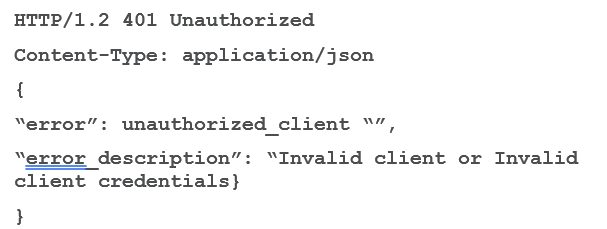
Authentication Error
If the OI API Gateway does not recognize your client credentials, it returns the following error.
| Error | Description | Solution |
|---|---|---|
| 401 Unauthorized | Invalid or expired token | Refresh your token |
| 403 Forbidden | Valid token but insufficient permissions | Request the necessary access permissions |
| Connection refused | Network or configuration issues | Verify service URL and network connectivity |
Best Practices
- Set a timer to refresh the token every 1 hour and 45 minutes to give a 15-minute buffer before the token expires.
- If you receive an authentication error, refresh the token immediately.
- Store the token securely in memory.
- Do NOT write tokens to disc or logs.
Updated 5 months ago
What’s Next
Once you've received a successful response to the Authentication Request, use the access token provided to submit the Transaction message. For more information, see Submitter Request linked below.